
Last Updated on March 11, 2026 by Christine Kaaloa
Digital Privacy Checklist for U.S. Travelers (Protect Your Phone, Data, and Money Abroad)
International travel comes with digital risks most travelers don’t think about until something goes wrong. Airports, hotels, public Wi-Fi, border crossings and even charging stations expose your phone and personal data in ways that don’t exist at home.
This digital privacy checklist helps prepare you with practical advice.
Disclosure: There are affiliate links in this post. Traveling with trip insurance offers me peace of mind for my solo travels. This is a trip insurance finder to match your budget! Check out my solo travel gear.
Why digital privacy matters for travelers
Table of Contents: Digital Privacy Checklist for U.S. Travelers – Protect Your Phone, Data and Money Abroad!
Today, digital privacy is right up there with travel safety, protecting your passport and avoiding pickpockets. Most travelers have a robust online life with their mobile phone being an essential component to their lifestyle.
Much sensitive personal information is stored on our mobile phones, from business text messages, email, banking and financial apps, apps with our credit card information, passwords, social media accounts/public identity and biometric data.
Meanwhile, public Wi-Fi is naively used and trusted more often while traveling through airports, in hotels… hell, even when you’re hanging out in McDonalds or Starbucks! Honestly, even I have naively trusted free public WiFi. For the most part, you never think anything will happen to you. … Until it does.
Here’s ways you can protect yourself if you’re not ready to fully give up free public WiFi.
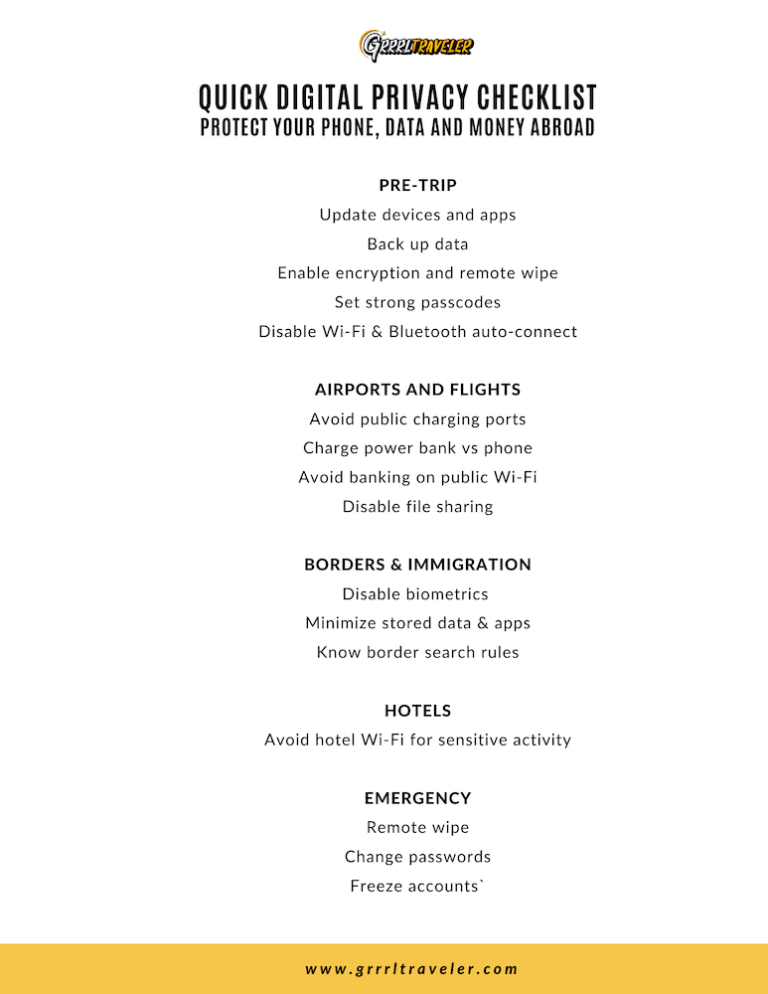
Digital Privacy Checklist for U.S. Travelers
Pre-Trip Preparation
Good digital security habits can be started before your trip even starts. It starts at home and reducing the amount of sensitive data accessible if your phone is lost, searched or compromised.
- Update your phone, tablet, and laptop to the latest firmware or operating systems. This makes it harder for hackers to break into your devices, as new firmware updates offer the latest security updates that protect you from viruses and hacking attempts.
- Update all apps, especially banking, email, cloud storage and social media.
- Back up your devices to a secure cloud storage and one offline backup. These days, videos and photos can fill our online storage capacity, making backups challenging. Either buy more online storage or go into your Settings and see which apps take the most space and if you don’t want to delete them, offload your apps.
- Remove apps you don’t need while traveling. iPhone offers the option to offload apps, rather than delete them and this helps you keep a trace or alias of the app on your mobile phone, without the excess weight.
- Log out of banking apps you will not use abroad. I like having my banking app on my mobile phone for quick access to my account in the case of ATM lockouts or if I ever lose my bank card.
- Set up notification alerts on your banking or credit card usage. This way, if your bank or credit cards are ever stolen or used without your knowledge, you get a notification immediately.
- Enable two-factor authentification on all essential apps like financial, email, password manager and social media accounts.
- Set a strong passcode If your phone is ever searched at immigration, they cannot require you share your password. But they can use your biometrics to unlock it it.
- Enable automatic screen lock. I set my phone to time out after two minutes. Then it goes into automatic screen lock where it asks for a password.
- Turn on “Find My Device” on iCloud. Many travelers forget this peace of mind feature that gives you control over your phone if it is ever lost! Yu can go into your Find My Device iCloud account and wipe your data remotely.
- Disable Bluetooth auto-connect. If you’ve ever connected to wireless earbuds or a portable speaker, you know that when pairing, your phone will search for an available bluetooth connection. You don’t want someone to connect with your bluetooth devices without you knowing.
- Turn off Wi-Fi auto-join. Similar to bluetooth, all Wi-Fi networks within your radius show up when you’re searching for an open Wi-Fi. You don’t want someone leeching off your WiFi. Not only is your data open to being hacked but strangers who auto-join can leech of your internet data plan.
- Screenshot and photograph travel documents instead of storing emails. This is one of the tips I have used for years. I always take photos or download pdf copies of important documents like my passport, tourist visa, hotel bookings, etc.. Email documents rely on an internet signal to download their attachments.
- Create a separate travel email for bookings and logins.
- Have a separate credit card and/or bank account reserved strictly for travel. In case your credit or ATM card is ever lost, a thief only gets access to your limited funds account. Also, it lets you easily know when and where your card was used last. Read 24 ATM tips to avoid scams and extra fees.
- Consider taking a burner phone instead of your personal phone.

Airports and Flights
Airports are one of the highest-risk digital environments travelers use regularly, because it is a transit hub for travelers who are on their way to other destinations. As a traveler, you are limited in resources and reliant upon whatever you packed and what the airport supplies. The golden rule here is if you wouldn’t do it on unsecured Wi-Fi at home, don’t do it at the airport.
- Avoid charging your devices on public USB charging stations (juice-jacking risk). Instead, I charge my power banks and let them charge my devices while I’m in-flight.
- Assume all airport Wi-Fi is insecure. Never log into banks or financial accounts on public Wi-Fi. It doesn’t hurt to buy a global e-SIM data plan – that you can activate in the airport using public Wi-Fi- but then use to surf the internet or hotspot your other devices.
- Disable file sharing and AirDrop
- Turn off auto-connect to known networks
- Use Airplane Mode and manually enable Wi-Fi Log out after any sensitive activity
- Always opt for a manual passport check over a biometric scan.
- RFID card and passport sleeves and RFID money belts help protect your credit and debit cards from digital theft.
As the airports and transit hubs can be a place of delayed flights and inconvenient layover stress, here’s some resource articles for you:
- Airports with Sleeping Pods (Free and Paid)
- Airlines that offer free transit hotels for layovers
- Airports that offer layover tours
- Survival guide tips for flight cancellations and delays.
- In-Flight Essentials to Pack for Long Flights
- Minimalist Packing for Carry-On Luggage
- check out my survival tips for connecting flights
Border Crossings and Immigration
American travelers often underestimate how digital privacy changes at borders. These days, there are more aggressive device searches and surveillance techniques at the borders. For instance, the U.S. can legally request to see your phone, social media accounts etc… If you are deemed suspicious for their profiling, they can request more aggressive searches of your devices. While foreign travelers are subject to searches, it’s handy to know your rights as a U.S. citizen.
- Power down devices before entering immigration checks to avoid accidentally triggering device searches
- Temporarily disable biometric identification unlocks such as Face ID and fingerprint unlock. They can be used to open your phone at immigration.
- Use a strong passcode instead of biometrics. If you phone is ever searched at immigration, they cannot require you share your password. But they can use your biometrics to unlock it it.
- Travel with minimal data stored locally
- Turn devices on Airplane mode to pause cloud syncing, during border crossings
- Always opt for a manual passport check over a biometric scan.
- Do not volunteer passwords or unlock devices unless legally required
- Separate personal email from travel email Understand that border search rules vary by country
- Border agents do not follow US domestic search rules once you leave the country.
- In Settings, Turn on Lockdown Mode. This is extreme protection, “blocking the most advanced attack methods by restricting its normal behavior” (macObserver) . If you feel you could be pulled over for a phone search, turn this setting on just before entering Immigration.
- Read more digital privacy tips before you reach the U.S. border (IMPORTANT!)
- Safety tips for crossing the U.S. border
Hotels, hostels and lodgings
Hotel Wi-Fi is convenient, but not always secure. Here’s some security tips to remember when using the free guest Wi-Fi.
-
- Watch for fake Wi-Fi networks with similar names
- Use a VPN when surfing the hotel Wi-Fi.
- Use your own hotspot or an global eSIM when possible
- Avoid accessing sensitive accounts on hotel Wi-Fi
- Avoid shared hotel computers and log out of smart TVs after use
- Always lock devices when leaving your room. Read 50 hotel hacks & safety tips.

Daily digital habits when you travel
Digital theft often happens quietly and without immediate signs. Small conscious safety habits reduce risk.
- Use contactless payments when possible. There’s a scam called skimming where a thief inserts a reader device that skims the information off your credit card if you insert it into a card reader. Contactless payments prevent that.
- Avoid scanning random QR codes. You don’t know where they will take you or what you download. It could be a hacking or scam attempt. Make sure you trust the poster with the code and that it has not been tampered with.
- Do not store passwords in Notes apps. I use a password vault like Dashlane, which syncs across my devices. I minimize storing my essential passwords in places like my internet browser. I might store secondary or third level accounts that do not hold my personal information or that I care less about.
- Enable two-factor authentication. From email, mobile apps and social media accounts, these days, hacked accounts are too common and most of the time, it’s because the user has not turned on two-factor authentification, which makes hackers go through two steps of authentification.
- Avoid public computers. A common mistake most travelers make is forgetting to log out of their accounts (email, financial, banking, social media, etc..) and erasing the history of whatever they are researching.
- Keep devices on your body, not in day bags or backpacks that you won’t have your eyes on. However, here are anti-theft bags to help you out should you choose.
If Your Phone Is Lost, Stolen, or Compromised
- Report and respond to the situation immediately.
- Check for unauthorized logins
- Report and/or freeze banking and credit card accounts that are affected. Though it’s always handy to have the Report Lost/Stolen numbers, you can usually find it on your financial institution’s website too, so don’t panic. Also, if you have the mobile app downloaded, you can report it there.
- Remote wipe your device, if it is stolen or lost. If you know your iPhone is beyond locating and saving, you can wipe your device through your Find my Phone app.
- Change all major passwords from a secure device
- File a police report if required. This is important if you are claiming reimbursement on your trip insurance. Police reports and as much documentation is vital.
- Contact your mobile provider if your home SIM card is lost or stolen.
Frequently Asked Questions
Is airport Wi-Fi safe for American travelers?
– No. Airport Wi-Fi should be treated as unsecured. Avoid financial activity.
Can foreign border agents search my phone?
– Yes, depending on the country. Digital privacy laws differ widely outside the US.
Do American travelers need a VPN?
– A VPN is not required, but it adds a layer of protection on public networks.
Are eSIMs safer than public Wi-Fi?
– Yes. Using your own data connection reduces exposure to unsecured networks. I have used Airalo eSim – they offer single and multiple country coverage.
Conclusion
Digital privacy is now part of responsible international travel. Awareness, preparation and better tech safety habits help western travelers protect their data with fewer disruptions, financial risks and long-term problems